 Leader CRM
Lead distribution that sends every car shipping lead to the right salesperson
Set who gets the next lead, how many in a row, how many a day and during which hours.
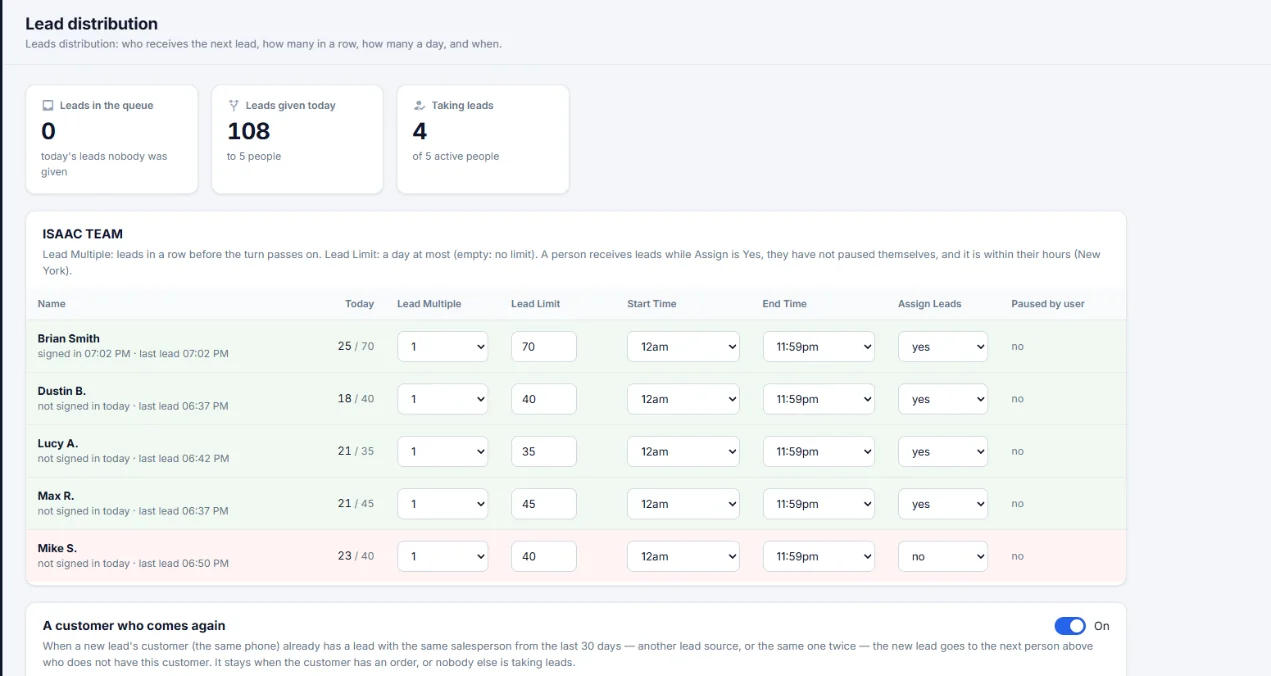
Lead distribution: what it does
Leads in the queue
Today's leads nobody was given, at a glance.
Returning customers
If the same phone already has a lead with that salesperson from the last 30 days, the new lead goes to the next person who does not have this customer. It stays put when the customer already has an order.
Today per person
Each row shows how many leads that person got today against their limit, and when they last got one.
How it works on a sales day
- Set
Pick the lead multiple, the daily limit and the hours for each salesperson.
- Run
Leads arrive from your vendors and go to whoever is next and inside their hours.
- Adjust
Turn assign off for someone on leave. They can also pause themselves.
Lead distribution: questions
Can I cap how many leads a salesperson gets?
Yes. Set a lead limit per person per day. Leave it empty for no limit.
Can a salesperson stop getting leads for a while?
Yes. Set assign to no, or the salesperson pauses themselves.
What happens when the same customer comes in twice?
When the same phone already has a lead with that salesperson from the last 30 days, the new lead goes to the next person who does not have this customer, unless the customer already has an order.
See Leader CRM on your own leads
On a live call, Brian walks you through quotes, follow-ups, orders and the owner view, then sets up your free trial.
Or email Brian
hello@kingpinsites.com