 Leader CRM
Central Dispatch and Super Dispatch, connected to your CRM
Post a load from the order, see what carriers were paid on the lane before you quote, and keep calls, texts and email in the same place.
From the quote page to a carrier on the interstate
The price, the contract and the Central Dispatch post live on one order, so the load moves without retyping.

Central Dispatch, from the quote to the posted load
Leader CRM reads Central Dispatch before you quote and posts to it after the customer signs.
Before the quote
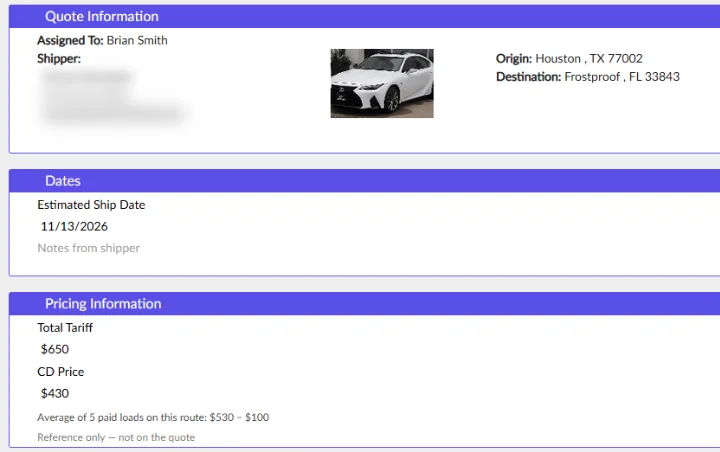
The quote page shows a CD price: the average of recent paid Central Dispatch loads on the same lane, and how many loads it used. It stays with the salesperson and never shows on the customer's quote.
After the signature
Every order has a Post to CD button. Posted loads move to the Posted CD tab, so the desk sees what is out on the board and what still needs a carrier.

- Signed
- Posted to CDNow
- Dispatched
Auto price
Prices a new lead from what Central Dispatch shows paid on the lane for the same vehicle, trailer and running state.
AI sales responder
A load the responder books can go on Central Dispatch at the carrier's part of the total. A load already posted under that order is linked, never doubled.
Connection status
The owner dashboard says whether the Central Dispatch connection is working, next to phones, email and follow-ups.
Dispatch stays human
Choosing and dispatching the carrier stays with your salesperson.

Super Dispatch
Leader CRM connects to Super Dispatch through the Super Dispatch API. If your carriers and drivers work in Super Dispatch, Brian sets up the connection with your own account on the demo call.
Book a demoA direct connection through the Super Dispatch API, made with your brokerage's own Super Dispatch account.
Brian connects it on the demo call and checks it with a real order.
Phone, email and leads in the same CRM

Phone and texting apps
Connect RingCentral or another calling and texting app you already use. Salespeople call or text a customer with one button in the CRM, every call and text lands on that customer, and missed calls come in every 5 minutes. RingCentral integration

Gmail
Each salesperson connects their Gmail, so quotes and follow-up emails go out from their own inbox and replies land in the customer's timeline.
Lead vendors
Leads arrive from each lead source's API, your website and quotes made by hand. The lead sources page shows what each one brought in.
One status panel
The owner dashboard checks phone lines, outgoing texts and email, Central Dispatch and lead vendors in one place.
How setup works
- Connect
On the demo call, connect your load board, your phone and texting app and your Gmail inboxes with your own accounts.
- Check
Open the owner dashboard. Each connection shows as working before your team starts.
- Sell
Quote with the CD price in front of you, post signed orders from the order page, and keep every call and text on the customer.
Integration questions
Does Leader CRM integrate with Central Dispatch?
Yes. Every order has a Post to CD button, posted orders sit in the Posted CD tab, quotes show a CD price from recent paid loads on the lane, and the owner dashboard shows whether the Central Dispatch connection is working.
Does Leader CRM work with Super Dispatch?
Yes. Leader CRM connects to Super Dispatch through the Super Dispatch API. Brian sets up the connection with your own Super Dispatch account on the demo call.
Do I need a new phone system?
No. Leader CRM connects to RingCentral or another calling and texting app you already use. Once it is connected, salespeople call or text a customer with one button inside the CRM, and every call and text is saved on that customer.
Can my lead vendors send leads straight into the CRM?
Yes. Leads arrive from each lead source's API, from your website and from quotes made by hand, and the lead sources page shows what each one brought in.
Does email go out from our own inboxes?
Yes. Each salesperson connects their Gmail, so quotes and follow-up emails come from their own address.
See Leader CRM on your own leads
On a live call, Brian walks you through quotes, follow-ups, orders and the owner view, then sets up your free trial.
Or email Brian
hello@kingpinsites.com