 Leader CRM
Risk alerts for payments, unhappy customers and unanswered texts
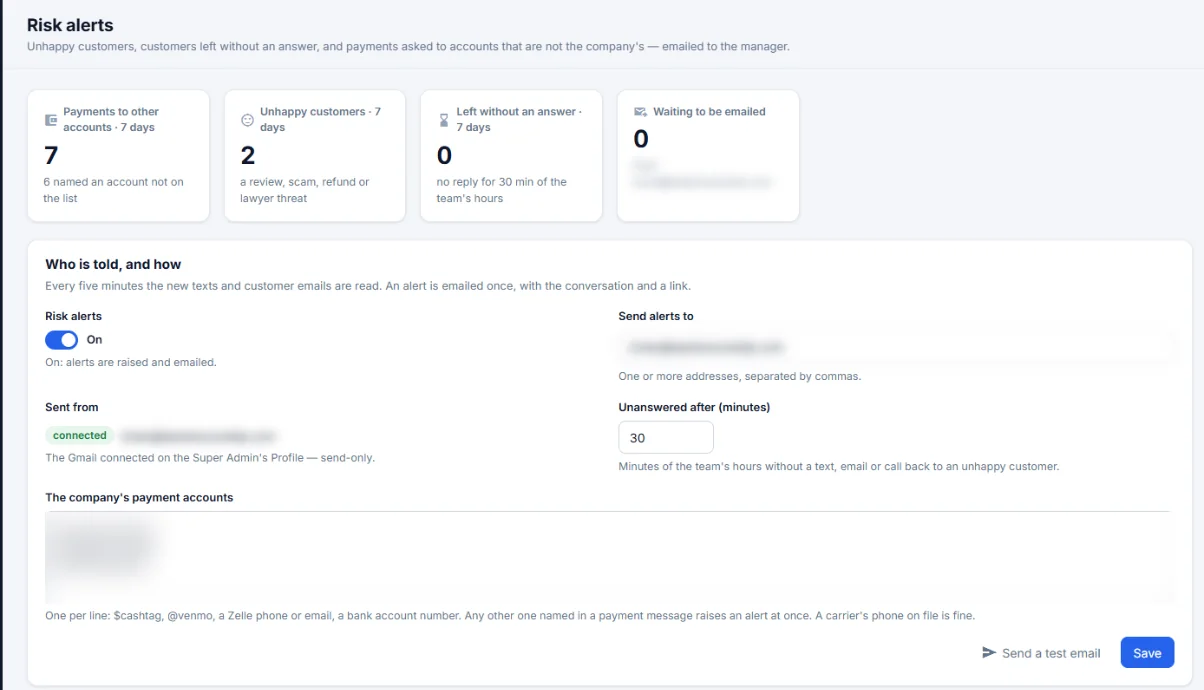
Every five minutes Leader CRM reads the new texts and customer emails, and emails the manager when something needs a person.
Risk alerts: what it does
Your payment accounts
List the company's own $cashtag, @venmo, Zelle phone or email and bank account, one per line. A carrier's phone on file is fine.
Who is told
One or more manager addresses. Alerts are sent from the Gmail connected on the admin profile.
STOP report
A daily email lists texts that went to numbers that had texted STOP.
How it works on a sales day
- Read
Every five minutes the new texts and customer emails are read.
- Alert
A risky message raises one alert, emailed with the conversation and a link.
- Act
The manager opens the link and steps in.
Risk alerts: questions
Why alert on payment accounts?
If anyone in a conversation asks the customer to pay an account that is not on your list, the manager hears about it within minutes, before the money moves.
Who gets the alerts?
One or more email addresses you choose. Alerts come from the Gmail connected on the admin profile.
Will a carrier's phone number set off an alert?
No. A carrier's phone on file is fine. The alert is for accounts that are not on the company's list.
See Leader CRM on your own leads
On a live call, Brian walks you through quotes, follow-ups, orders and the owner view, then sets up your free trial.
Or email Brian
hello@kingpinsites.com